Follow Me

Monday, 28 January 2013

Blogging Tips: Confessions of a Six Figure Blogger Book Review

For a more personal spin in field of blogging, you might want to take a look at Blogging Tips: Confessions of a Six Figure Blogger. It’s a new book (Amazon Kindle & Paperback) written by Blogging Tips guru Zac Johnson and in it, he provides all kinds of useful information about how to get into blogging and what you need to do when you get there if you want to be a “six figure blogger” yourself. Let’s dive in and have a look at this new book.

A Story of Blogging Success

Zac is not new to the Internet. He has been making money online for over 15 years and he has been blogging professionally for a little over five years. While there are some connections, he recognizes there are differences too.
And that’s how he chooses to begin Confessions of a Six Figure Blogger. Available as an e-book for Kindle,Blogging Tips starts with a bit of a personal story about how Zac got into blogging in the first place, expanding beyond Internet marketing and online advertising into content creation by way of ZacJohnson.com.
There are many opportunities available to you and Zac wants to stress that you can “become an authority in any niche.” By way of blogging, Zac has been able to create a brand, build a business, and expand his international presence by way of appearances at conferences, as well as on ABC and FOX News.

What Can I Expect to Learn?

While Zac’s personal story may be of personal interest to you, there’s a better chance that you’d rather learn how to emulate his success and put six figures into your own bank account.
As you dive into Confessions of a Six Figure Blogger, you’ll find that the progression is natural and logical. He starts by talking about what you need to know about blogging, like why blogging is the future of the Internet and branding. He then talks about the steps that you need to take to go live with your blog, as well as many of the critical monetization methods that you need to employ.
If you’ve read other books on the subject, like Make Money Online: Roadmap of a Dot Com Mogul, then some of this material will feel familiar to you. Even so, Zac offers a fresh perspective and it’s all laid out in an easy to understand and easy to follow manner. If you’re new to blogging, then this e-book is even more valuable. While it is extensive, it is also easily digestible.

Actionable Items You Can Use Right Now

One thing that struck me about this e-book was that it was definitely on the text-heavy side of things. There really isn’t anything included by way of graphics or visual aids, but these aren’t really needed for the most part anyway.
What Zac does very well is explain what may otherwise be some esoteric information about how to blog successfully in more of an everyday language. More importantly, he doesn’t talk too much about what would work in theory or the about the philosophy of blogging. Instead, he provides directly actionable items.
In the chapter with 10 must-dos for serious bloggers, as an example, he stress the importance of having a great logo created for yourself, for your blog, or for your brand as a whole. He also suggests some logo creation services that he recommends, as well as the typical pricing from these designers. It also helps that, along the way, he also links to some of the blog posts from his archive that you may find useful and relevant.

How Much Does It Cost?

Considering the wealth of information contained in this book, you’re probably going to be surprised by the price. It’s available now in the Kindle Store for just $2.99. That’s less than five bucks and you get nearly 100 pages of incredibly useful, easy-to-read, and actionable knowledge about what it takes to be a six figure blogger. Remember that you don’t need to have a Kindle to read Kindle e-books; there are Kindle apps for PC, iPhone, iPad, Android, and several other platforms. Go get it. This is well worth more than the three dollar asking price.
Get your copy of Zac’s new Blogging Tips” book today!

0 comments:

5 Data Recovery Tools to Recover Deleted or Damaged Files

Nowadays, data is incredibly important to an individual or for any business. Various types of data are collected and stored by almost every organization in the world. Data is often extremely valuable to companies, and as such data recovery tools have become somewhat essential to businesses to help avoid data loss.
Many users use online data backup tool like Dropbox, Skydrive and many more, though they are the best to keep your data on cloud, but how do you deal with corrupt data on your hard-disk. How will you fix a video file which is partially downloaded and how about recovering your convocation pictures from a badly scratched CD/DVD.

Such situations keep coming and to make sure that we don’t lose out important data and recover them quickly, there are many paid and free software’s available in the market, which helps you to recover different types of data files on your system. Here I’m compiling a list of such data recovery software’s that you can use and recover your data without any pain or loss. Though, by the end it all depends upon how badly your data is corrupted and if it’s possible to recover it or not.
Anyhow, before we move ahead, here is a quick tip: Make sure you maintain 2-3 backup of your important data. You can take help of online storage websites like you can store all your images on sites like Flickr, Picasa. You can use Amazon S3 backup to store your important files and keep them safe and secure. You can use Evernote to keep a backup of important notes and web clips.

5 of The Best data recovery tools available:


Here, I’m sharing those data recovery software’s which works for different media files and most of them are completely free. Though there are many amazing paid options which work out of the box, but these free once are none the less. If you think I missed any such free tool, which is worth a mention here, you can let us know about it on our Google plus page.
1. Undela : Free Data recovery tool


Undela is an exceptional, free-to-use program that has the ability to recover deleted files very quickly. It is even possible to recover data from damaged hard disks using Undela. In the event of a virus attack or power failure, Undela can recover any deleted files. As well as hard drives, you can recover data from a variety of media types, including MP3 players, SD Cards for your digital camera and USB memory sticks.
No matter what document type has been lost, whether an e-mail, image, audio or video file Undela can easily recover it. Even if the file has been deleted from the Recycle Bin you may still be able to retrieve it. Supported file allocation types include NTFS, NTFS5, FAT12, FAT16, and FAT32 in Windows, and XFS in Linux.
In addition the software is easily accessible to all users due to its multilingual interface. Currently supported languages are English, German, French, Italian, Korean, Japanese, Chinese, Spanish, Portuguese and Russian. Deleted files are easily searchable by file name or mask. The tool also presents previews of any  deleted document.
Features:
  • Recover deleted files even when emptied from the Recycle Bin
  • Recover files deleted in the event of a virus attack or power failure
  • Recover compressed files
  • See a preview of deleted documents and image files
  • Retrieve multiple files using one click
  • Search deleted files by file name or mask
  • Select hard drives to be scanned for files
  • Languages currently supported include English, Spanish, German, Chinese, Italian, French, Korean, Japanese, Portuguese and Russian.
Key Advantage:

  • Recover deleted data from a range of different media types, e.g. flash cards, hard drives, USB devices, digital camera SD cards, smart cards and more.


2. CD Recovery Toolbox


Free CD recovery Software

CD Recovery Toolbox is another free data recovery tool, ideal for recovering data from damaged, corrupt, scratched CDs or DVDs. In addition this tool is also able to recover files from HD DVD and Blu-Ray discs. The tool is very easy to use: simply select the drive and the files you wish to recover to start the process. The recovery is usually very quick,  though the effectiveness of the recovery may depend on the extent of the damage to the source media.
If your CD is severely scratched, the recovery process will take longer, and may sometimes fail to recover all the lost files. It does however help to recover a large amount of data that may otherwise be lost forever.
Key Advantage:
  • This tool is really easy to use and ensures quick data retrieval from any scratched and damaged CD/DVD.


3. Mail PassView


To ensure effective backup of any e-mail information, use Mail PassView to export your email account settings. A number of email applications are supported, including  Microsoft Outlook and Outlook Express, Windows Live Mail (Hotmail), Incredimail and Eudora. Run the software to find your Email login details (username and password) and any other details from your e-mail client.
The recovered information can be exported as a text file or copied onto the clipboard to be pasted into a Word Document or any other text file. A word of warning: your antivirus software may consider an e-mail retrieval tool as a hacking tool and as such might alert you when you attempt to run the program.
Key Advantage:
  • Another piece of software that is really simple to use, supporting a range of email clients,  easily exporting your account details and passwords should you require it.


4. MP3val 


Recover corrupt mp3 songs

If you’re looking to recover corrupt MP3 files, MP3val is the ideal piece of data recovery tool for media files. This tool enables you to scan and fix MP3 files that have lost data. Occasionally MP3 files are rendered unplayable due to an incomplete download or sometimes because of other issues.
MP3val is able to fix the majority of these issues and will also automatically create a backup file of the original file. In addition to restoring MP3 files, you can also use this software to fix MPEG files. Unfortunately these are the only types of files that can be restored.  The software gives very fast results. As standalone software there is no installation necessary. MP3val uses a front-end GUI with a command-line version.
Key advantage:
  • MP3Val fixes corrupt MP3 and MPEG files, automatically creating a backup of the original files. Crucially no installation is necessary.


5. DivFix++ 


DivFix++

If you’re looking to restore data from partially downloaded video files, look no further than DivFix++. You can use this tool to fix any DivX (AVI) movie files. The tool will  build the index element of the file, which is the part that frequently goes missing if a movie download is incomplete. There is a built-in error-detection feature that can identify the problem with the file and fix it. Original files are always backed up.
The software offers Multilingual Support and also supports a number of operative systems – Windows, Linux and Mac OSX.
Well these are just few of many data recovery tools that I can think of now and there are many others for Wi-fi passwordexchange password and many more specific software’s, which we will cover into next article of our data recovery series. If you want to share any other free software, do let me know via comment. Also, if you find this post useful don’t forget to share it on Google plus and Facebook.


0 comments:

How To Copy From Right Click Disabled Websites

Copy-pasting some body else work is very common. Though, very few people actually give the credit link or mention about the source. Specially, in Blogging people copy each other content and increase plagiarism. Apart from all Auto-bloggging tool, most common form of copying a page is by selecting text > mouse right-click and copy the content. Though in WordPress, we can easily disable this by using disable right click WordPress plugin. Though according to me right click gives a bad user experience and for Bloggers, you can always fight such copy-paste blogger using Google DMCA.

Right-click-disabled

Now for me, when I have to write a tutorial, I take information from the pages on Internet and give proper credentials with link in the post. Now, the problem which I have faced recently is many of these sites have right click disabled and it’s pain to copy from these sites normally. So, here I have compiled a series of possible ways to copy content from those pages. FYI, many websites disable CTRL +C options to ensure better security from hackers and malicious sites.


Ways to copy text from Right click Disabled pages:

Most of the bloggers and webmasters uses JavaScript technique to disable right-click, to prevent scrapers sites from stealing their content.
Many times we often come to websites where we found contents useful like how-to , Guides and we copy it into worded or notepad. Generally we select some text and then right click to copy. But on Protected sites a message box appears saying “Right-Click on this site is disabled. Hold Ctrl key and click on link to open in new tab
But there are numerous way through one can copy contents from Right Click protected sites
  • Simplest Way
  • By disabling browser JavaScript in browser
  • Using Proxy Sites
  • By Using the source code of the site


Simplest Way

Visit that webpage.

Press Ctrl+S on your keyboard.

Save the webpage anywhere on your computer.

Now open the downloaded webpage. You can copy or you can do anything.

Enjoy !

I think this is the easiest step.


Disabling JavaScript in Browsers [Google Chrome]

In Chrome browser, you can quickly disable JavaScript by going to settings. See the screenshot for better explanation:
chrome-disable-javascripts


  • Goto Setting >> UnderHood Tab >> Content Settings


  • or enter  chrome://settings/content


  • Then Select Do not allow any site to run JavaScript


  • Similarly if you are using Firefox, you can remove the tick from “Enable JavaScript” option.

    0 comments:

    Download Wondershare Data Recovery

    Wondershare Data Recovery

    Deleting, Formatting, or Inaccessible? Retrieve lost data!

    Wondershare Data Recovery offers you a quick data recovery, safe, easy and fast!
    Safe, easy and fast! This is how Wondershare Data Recovery, a powerful yet easy-to-use Windows data recovery software, retrieves your lost videos, photos, music, documents, email and archive files, etc. from various disks, such as internal hard drive, USB drive, external hard disk, mobile phone, digital camera, iPod, MP3/MP4 player, and other storage media. This cost-effective and non-destructive data recovery tool enables you to perform data recovery thoroughly with unique recovery modes.
    • Wizard Mode Recovery - Find lost files by answering two questions in baby steps for beginners.
    • Lost File Recovery - Recover files formatted or deleted by Shift + Delete, emptied from Recycle Bin with original filename and path.
    • Partition Recovery - Retrieve corrupted or lost partitions with the complete data stored.
    • Raw Recovery - Deep scan and recover data even when the file system is corrupted.

    Powerful Recovery Ability

    Different File Types: Photo, video, music, document, Email, ZIP, etc.
    Overall Data Loss Situations: Deleted, formatted or lost for other reasons.
    From Various Devices: Internal hard drive, USB, external hard disk, mobile phone, digital camera, iPod, MP3/MP4 players and more.
    100% safe Windows data recovery program to recover data without any damage on your data.
    Powerful Recovery Ability

    Flexible & Precise Data Recovery

    Flexible to pause, restart data recovery in the scan process according to your needs.
    Save and import the previous scanning results to do resume recovery without rescanning.
    File name, size and date filter let you find specific files quickly to save you much time.
    Flexible & Precise Data Recovery

    Preview Before Recovery

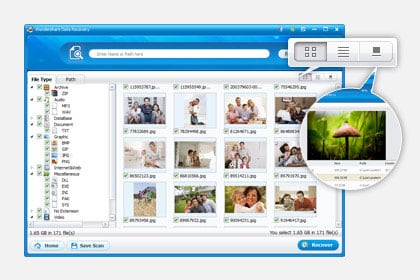
    Common file formats allow to preview, such as BMP, GIF, PNG, JPEG, JPG, TIF, DOC, DOCX, HTM, PDF, PPT, PPTX, RAR, XLS, XLSX, ZIP, etc.
    Image preview helps to find your target files and check the quality before recovery.
    Preview of documents and archives lets you confirm in advance whether it's the one you want to recover or not.
    Preview Before Recovery

    Easy to Use

    Easy to Use

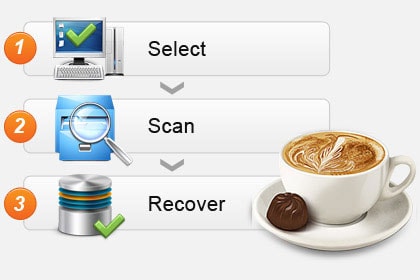
    Retrieve data within only 3 simple steps, just as easy as 1-2-3. Follow the clear and brief instructions on the interface, and no prior recovery experience required.
    The friendly Wizard Mode recovery enables beginners to recover lost files by answering only two questions.


    0 comments:

    School Is Out, Porn Is In - Protect your children using internet filter software

    TODDLER ON LAPTOP
    Parents, take heed. Summer means fun and sun for young people, but there could be a dark side to all that free time. Is your teen home alone? Are the computers in your house protected from porn sites? Unfortunately, it’s possible your students are finding sexually explicit material online that could hurt their emotional, spiritual and even physical health.

    According to TopTenREVIEWS Google Analytics data reveals a dramatic increase – indeed a 4,700% jump – in searches for the term "porn" in the days immediately following the end of school for most students. While falling short of scientific proof, it's a strong indicator of what many youngsters may be doing on their summer vacation.


    There could be many explanations for this dramatic change in numbers, but there is no question it coincides with the time most schools get out.

    Since parents are busy and cannot constantly stand guard over computer use, a little electronic help might come in handy. Internet filter software can offer some reassurance to parents that their children are protected from material that parents deem objectionable.

    The internet filter software on the market today allows parents to block websites and chat rooms that parents deem inappropriate. This software can do much more including such things as filtering emails, monitoring social media sites and sending parents email alerts if someone using a computer is accessing objectionable content.

    Academic studies have shown that young people who are exposed to sexually explicit material before age 18 are more likely to become promiscuous, get pregnant, test positive for a sexually transmitted disease and engage in forced sex.


    Nothing takes the place of heart-to-heart talks between parents and children about values, human sexuality and the things that are considered healthy, respectful and worthwhile according to a particular family’s principles.


    However, internet filter software can shield children from images, language, videos and other depictions of behaviors that are contrary to the parents’ standards. It could be another tool to help parents get involved in the already complicated task of trying to raise healthy, well-adjusted children.


    Dr. Mary Anne Layden, director of the Sexual Trauma and Psychopathology Program,
    Center for Cognitive Therapy in the Department of Psychiatry at the University of Pennsylvania, is the author of “The Social Costs of Pornography: A Statement of Findings and Recommendations.”


    "There is evidence that the prevalence of pornography in the lives of many children and adolescents is far more significant than most adults realize, that pornography is deforming the healthy sexual development of these young viewers, and that it is used to exploit children and adolescents,” Layden wrote.


    How does it deform them?

    In a telephone interview, Layden said academic studies show that there are 23 unhealthy behaviors that people exposed to "sexualized media" before the age of 18 are more likely to display. These can include a greater likelihood to have sex earlier in life, have multiple partners, engage in forced sex, test positive for Chlamydia, be more accepting of sexual harassment and become juvenile offenders.

    “Are any of those things the kind of things we want for our kids?” Layden said. “My own research shows that pornography is mis-education about sex. It lies about sex.”

    For example, she said pornography shows that women love to be degraded and violently hurt, which is not true in real life. It also depicts men as vicious, narcissistic and out of control – which is also not true, she said.

    “This is hate speech against men and hate speech against women,” Layden said. “It sends the wrong message about people, relationships and functions. Porn doesn’t say anything about love or commitment or caring. It also doesn’t say anything about producing children.”

    The blunt-talking and often controversial Layden said she tells parents, “You’ve got to say to children: ‘There won’t be any porn in this home’” and then take strong measures to keep it away from impressionable youngsters.

    “It’s good to talk to the kids, but I think prevention is 100 percent better,” Layden said.


    FEMALE STUDENT ON LAPTOP ALONE


    What is Internet filter software?

    Schools and businesses can easily have dozens of computers operating at once, with many or even all of them providing Internet access. Wherever Internet access is available, there’s always the possibility that members of an organization may visit websites you’d rather they stay away from, as well as the ever-present threat of the Internet being used as a tool for Cyber bullying or sexual harassment. With the abundance of inappropriate material available online, such as pornography, games and gambling, it can be a challenge to effectively filter and limit access to those sites.


    With Internet filter softwares you can 


    Block web sites in more than 70 categories, including pornography, gambling, drugs, violence/hate/racism, malware/spyware, phishing
    Force SafeSearch on all major search engines
    Set time restrictions to block web access during designated times
    Configure custom lists for "always allow" and "always block"
    Override a web page block with password
    Trust the enhanced anti-tampering, even children can't break
    View easy reports to monitor and control web activity
    Real-time categorization of new adult and malicious sites


    Some of Internet filter software available are - 


    Paid Software - 


    0 comments:

    Sunday, 27 January 2013

    free Aircel GPRS Trick 2012

    Free gprs trick for aircel connection is found this trick is the latest trick in aircel connection.
    Below i have displayed in detail about the latest free gprs trick in aircel connection.
    • Get free settings for your mobile phone from aircel connection
    • connect one day gprs pack in aircel connection by easy recharge
    1 hour before the end of gprs pck remove your sim card from your mobile phone and replace it after 2 to 3 hours you will

    0 comments:

    Idea Free SMS Trick

    Idea mobile free sms centre tricks for new 2009 use this tricks then you will able to send free sms
    Note:This will work in BIHAR/JHARKHAND
    and
    Keep Balance -1Rs
    Now change your message center number to : +919891030080

    0 comments:

    Vodafone MMS Trick

    If you want to send free MMS in Vodafone then this must help you
    Just do the following configuration
    Free vodafone GPRS:-
    Proxy Address: 10.10.1.100
    Port: 9401
    Bearer: Packet Data
    Access Point:portalnmms

    0 comments:

    Lock/Unlock Codes For Land Line Users

    This is only for Land line Phones.
    • How To Register Secret Code.
    Suppose you want to make 5555 your secret code.Follow this procedure:
    Dial 123 5555 5555 then wait for the acceptance tone then disconnect. Your code is registered.
    • How To Change Secret Code.
    Suppose you want to change current code 5555 to 4444 then Dial 123 5555 4444 then wait for the acceptance tone then disconnect. Your new code(4444) is registered

    0 comments:

    Idea SMS Trick 2012

    For free SMS just change your message center number to
    +919892999886
    +919891030080
    +919844298443

    0 comments:

    Reliance CDMA & GSM Customer Care Number

    For Reliance CDMA & GSM  customers:
    For Postpaid : Dial * 222 from your Reliance Phone or 30333333 from any other phone.
    For Prepaid :
    Dial *333 from your Reliance Phone or 30333333 from any other phone.
    Dial *369 from your Reliance Phone for access to Admin menu ( For checking the account balance,
    Recharge and Language change option).
    Dial *225 (SMS option for retrieving account balance and STV validity) or SMS

    0 comments:

    Airtel GPRS Trick For HTC Pocket PC

    I tried it on Windows Mobile 6.0 and 6.1, and it worked like charm for me.
    Here are the steps to configure settings to use internet in PDA browsers.
    • Tap Start -> Settings.
    • Select Connections Tab and tap Connections.
    • Select Advanced Tab, tap Select Networks button to bring up Network Management.
    • Under “Programs that automatically connect to the Internet should connect using:” drop down, tap the New button.
    • In the General

    0 comments:

    How To Create a Favicon For Your Blog Using PicMonkey

    Seems as though most blogs and websites have their very own favicon, those teeny tiny images you see along tabs and in bookmarks.

    favicon on tab

    These are another way to have your blog stand out from the crowd, handy when you have a whole heap of tabs open!

    To make one is super easy, honest, and I’m going to show you how.
    When choosing an image for your favicon you want to take into consideration that it will be shrunk A LOT! Much of the detail will be lost in the shrinkage.

    You also might want to go with something that ties in with your blog header and blog button, be consistent!

    Once you have decided on your image, upload it to PicMonkey.

    upload photo for favicon

    Resize your image to about 100x100.

    resizing favicon

    Add any effects, remember, anything to fancy will most likely be distorted when the image is shrunk further.

    adding effects to favicon

    Once you are happy with the image, {Save} it to your computer.

    Next you need to open a new web page and go to favicon.cc
    This is where your image will be turned in to an actual favicon image.

    creating a favicon

    Use the {Import Image} tab to open select the image you want to use as your favicon.

    When the {Import Image} window opens, you will need to select {Choose File}, this will allow you to select the image you want as your favicon.

    Then hit {Upload}, this is upload your favicon image.

    uploading favicon image to favicon

    Your favicon, will appear.

    Don’t Panic! It is supposed to look like this!

    uploaded favicon image

    Below the favicon image will be your favicon code, copy this.

    download favicon code

    Now that you have the code for your favicon you need to add it to you blog.

    From your blog layout, go to {Layout}.

    In the top left hand corner you will see the Favicon gadget tab, click on {Edit}.

    blog layout for favicon

    When the {Configure Favicon} window opens, you will be able to {Choose File}, this is the one you down loaded from Favicon.cc.

    configure favicon

    Once uploaded, you will see a small image of your favicon.

    If you are happy, hit {Save}.

    uploaded favicon to blog layout

    Your favicon image will now appear in the top left favicon gadget.

    favicon image on blog

    So, now you have your very own favicon!

    I hope you found this useful, if you have any questions please ask!

    Once you have done all the steps to great your favicon, it can take Google or which ever browser you use about 24 hours to crawl your blog and pick up on the new favicon. Don't panic if you can't see the new one right away!

    0 comments:

    Receive all updates via Facebook. Just Click the Like Button Below...

    Powered By EXEIdeas

    Blogger Template by Clairvo